Organize code by feature, not by type
Organize code by feature, not by type#
Every project needs a folder structure: backend, frontend, CLI, any software. There are two ways to split files:
- by type: models in one folder, controllers in another, tests in a third;
- by feature: everything about one feature in one folder.
My rule: always organize by feature. This post explains why, with an example tree and the special case of the “utilities” folder.
The bias: the Windows XP home folder#
Many of us learned to organize files here:
My Documents/
├── My Music/
├── My Pictures/
└── My Videos/
Folders by type. Now store your vacation: notes, photos and videos. Then show it to your family and friends. Where does it go?
My Documents/vacation-notes.txt
My Pictures/vacation/
My Videos/vacation/
Three places, and you jump from one folder to the other while presenting. Grouped by what it is about, it’s one folder:
Vacation 2026/
├── notes.txt
├── beach.jpg
├── dinner.jpg
└── boat-trip.mp4
The same in code#
You usually work on one feature at a time, across all the layers: data model / DB → backend → API → frontend.
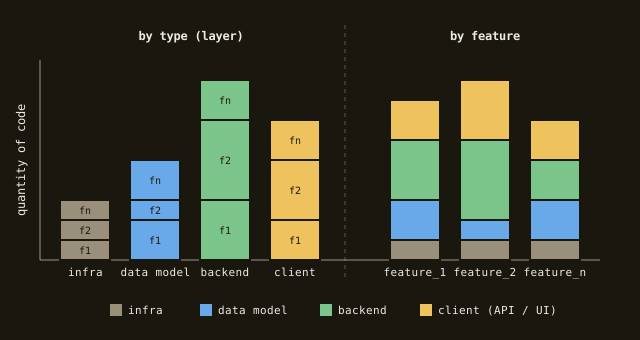
- Grouped by type (left), each folder holds one layer of every feature: to work on
feature_2you open four folders and edit a slice of each. - Grouped by feature (right), each folder holds all the layers of one feature: you open one folder.
- The code is the same: only the cut changes. Cut along the way you work.
In practice#
Wrong: by type#
The classic Phoenix layout splits the core, the web layer and the tests:
lib/
├── my_app/
│   ├── orders.ex
│   ├── products.ex
│   └── product.ex
└── my_app_web/
    ├── controllers/
    │   ├── order_controller.ex
    │   └── product_controller.ex
    └── live/
        ├── order_live.ex
        └── product_live.ex
test/
├── my_app/
│   ├── orders_test.exs
│   └── products_test.exs
└── my_app_web/
    └── controllers/
        ├── order_controller_test.exs
        └── product_controller_test.exs
A change to products touches lib/my_app/, lib/my_app_web/controllers/, lib/my_app_web/live/ and test/.
Right: by feature#
lib/my_app/
├── products.ex                      # MyApp.Products: core logic
├── products/
│   ├── product.ex                   # MyApp.Products.Product: schema, the data model
│   ├── product_controller.ex        # MyApp.Products.ProductController: API
│   ├── product_live.ex              # MyApp.Products.ProductLive: UI
│   ├── products_test.exs            # MyApp.Products.ProductsTest
│   └── product_controller_test.exs  # MyApp.Products.ProductControllerTest
├── orders.ex
└── orders/
    ├── order.ex
    ├── order_controller.ex
    ├── order_live.ex
    └── orders_test.exs
- Module names follow the path:
products/product_controller.exdefinesMyApp.Products.ProductController. - The core module sits beside its folder:
products.exisMyApp.Products, the entry point of the feature, and everything inproducts/isMyApp.Products.*. - To run tests next to the code, add
"lib"totest_pathsinmix.exs(each test path needs its owntest_helper.exs). - Files the tools expect in a fixed place (e.g. Ecto migrations in
priv/repo/migrations/) stay there.
The same works anywhere, e.g. in a frontend:
src/features/cart/
├── Cart.tsx
├── useCart.ts
├── cartApi.ts
└── Cart.test.tsx
Why it works#
Features are atomic: drop
products.exandproducts/and you drop a feature; create them and you work there, without jumping between tests, core logic and web layer.Features can’t grow too much: when a folder gets big, it’s a sign to split it into subfeatures:
orders.ex          # MyApp.Orders
orders/
├── order.ex       # MyApp.Orders.Order
├── checkout.ex    # MyApp.Orders.Checkout
├── checkout/      # MyApp.Orders.Checkout.*
├── refunds.ex     # MyApp.Orders.Refunds
└── refunds/       # MyApp.Orders.Refunds.*
A feature can be technical too:
authfor authentication,rbacfor permissions,csvfor tools that work on CSV files,web/controllerfor what all controllers share (e.g.web/controller/fallback_controller.ex,MyApp.Web.Controller.FallbackController). Not only the business features.
No “utilities” folder#
utils/ or utilities.ex is where you put the universe. It has no topic, so everything fits, and it grows forever.
Wrong#
lib/my_app/
└── utilities.ex   # parse_csv, translate, export_xlsx, check_token, format_error, ...
Right#
Split it by feature, like the rest of the code:
lib/my_app/
├── csv/           # read and write CSV files
├── translation/   # locales and translations
├── excel/         # Excel import and export
├── auth/          # tokens and sessions
└── errors/        # the error schema, logging and rendering
- Every folder has a topic, so it stops growing when the topic is covered.
- You know where to look, and where to put new code.
- See Errors: model them once, catch them once for what goes in
errors/.
Wrapping up#
- Group by feature, not by type: you work on one feature across all layers, so keep its layers together.
- One folder per feature, with its data model, API, UI and tests, and the core module beside it.
- Module names follow the path:
products/product.exisMyApp.Products.Product. - Atomic features: add or remove a feature by adding or removing its folder and core module.
- Split big features into subfeatures.
- No utilities folder: technical helpers are features too (
csv,auth,errors).